
Introduction
Do you want to learn C programming and become confident in coding? Whether you are just starting or have some experience, learning C programming is a fantastic skill that opens doors to many opportunities. C is a straightforward yet powerful programming language used in creating software, operating systems, and much more. Let’s dive in and explore the best way to learn C programming, starting from the basics and advancing step by step.
What is C Programming?
C programming is a computer language that was created in the 1970s by Dennis Ritchie. It is simple, fast, and reliable. Many other programming languages, like C++, Java, and Python, were inspired by C. When you learn C programming, you build a strong foundation that helps you understand these modern languages better.
C is used in many areas, such as building operating systems like Windows, writing programs for small devices, and developing software that needs to run fast. Learning C gives you the tools to create almost anything in the programming world.
Understanding the Basics That Every C Programmer Should Know
Before jumping into advanced topics, it’s important to understand the basics. Here are some of the key ideas:
Syntax and Structure
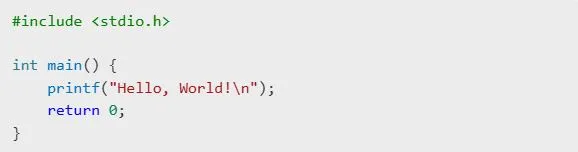
C programs follow specific rules, called syntax. Every program needs:
- Pre-processor Directives: These lines start with
#and include libraries, like#include <stdio.h>. - The
**main**Function: This is where your program starts running. - Statements: Instructions written inside curly braces (
{}) and ending with a semicolon (;).
For example:
Data Types and Variables
Variables store data. In C, you must define the type of data a variable will hold:
**int**: Stores whole numbers, like 10 or -5.**float**** and ****double**: Store numbers with decimals, like 3.14.**char**: Stores single characters, like ‘A’.
Example:

Input and Output
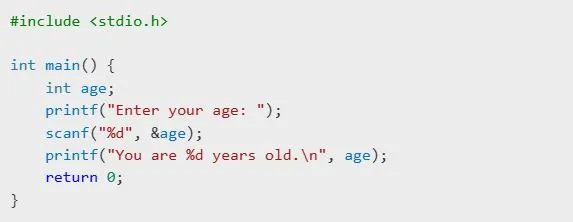
To interact with users, you can use functions like printf() for output and scanf() for input:
Control Flow
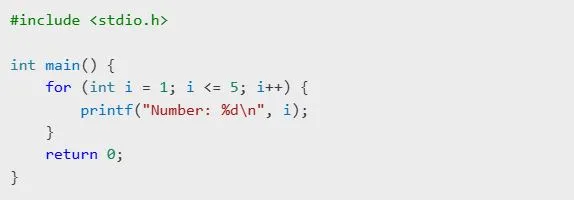
You control how your program runs using loops and conditions:
- If-Else: For decision-making.
- For Loops: For tasks that repeat a specific number of times.
- While Loops: For tasks that repeat while a condition is true.
Example:
Setting Up Your C Programming Environment
To start programming, you need the right tools:
- Choose a Compiler: A compiler converts your code into something the computer can understand. Popular ones are GCC, Clang, and Turbo C.
- Select an IDE: An Integrated Development Environment (IDE) makes coding easier. Options include Code::Blocks, Dev-C++, and Visual Studio.
- Install and Test: Set up your software, write a simple program like “Hello, World!”, and check that everything works.
Working with Variables, Data Types, and Operators
Variables and Types
Variables are like containers for data. Each has a type that defines what kind of data it holds:
- Use
intfor numbers without decimals. - Use
floatordoublefor numbers with decimals. - Use
charfor letters.
Operators
Operators let you perform actions on variables:
- Arithmetic Operators: Add (
+), subtract (-), multiply (*), divide (/). - Relational Operators: Compare values, like greater than (
>) or equal to (==). - Logical Operators: Combine conditions, like AND (
&&) or OR (||).
Example:

Functions and Modular Programming in C
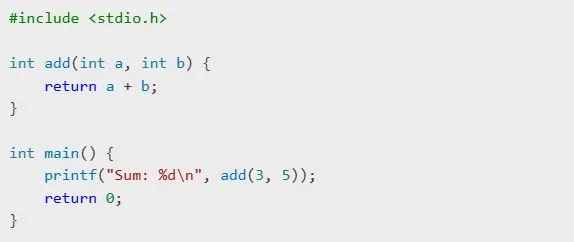
Functions make your code organized by breaking tasks into smaller parts. A function has:
- Return Type: What it sends back (e.g.,
intfor numbers). - Name: What you call it.
- Parameters: Data it takes in.
- Body: What it does.
Example:
Error Handling and Debugging
Errors happen, but fixing them is part of learning. There are three main types of errors:
- Syntax Errors: Breaking the rules of the language.
- Runtime Errors: Problems when running the program.
- Logical Errors: When the program doesn’t do what you want.
Use tools like GDB (GNU Debugger) or add printf() statements to check values and find bugs.
Best Resources to Learn C Programming
Here are some resources to guide you:
- Books: “The C Programming Language” by Kernighan and Ritchie.
- Websites: Bright Future, Codecademy, and TutorialsPoint.
- C Programming Tutorials for Beginners: YouTube channels like Programming with Mosh.
- Practice Sites: Try HackerRank and LeetCode for challenges.
Tips to Advance in C Programming
- Learn Pointers: These are tricky but powerful tools to work with memory.
- Understand Data Structures: Like arrays and linked lists.
- Practice File Handling: Reading and writing files is essential.
- Take on Projects: Build a calculator, game, or utility.
- Explore Advanced C Programming Techniques: Dive into dynamic memory allocation and multi-threading.
Common Mistakes to Avoid
- Skipping basic concepts.
- Ignoring warnings from the compiler.
- Not practicing enough.
- Avoiding debugging tools.
Final Thoughts
Learning C programming is a rewarding journey. Start with the basics, practice regularly, and challenge yourself with advanced topics. With time and effort, you’ll be able to build amazing projects and grow as a programmer. Keep coding, and enjoy the process!